Databases for Developers: What You Learn the Hard Way
Last Updated: May 28, 2026
Table of Contents
- What Most Developers Get Wrong Early On
- The Real Advantages of Understanding Databases Deeply
- Where Developers Actually Get Stuck
- Improvement Tricks Most Tutorials Skip
- Pros & Cons at a Glance
- Frequently Asked Questions
Most developers don't learn databases. They learn just enough SQL to get their ORM working, then spend the next two years wondering why the app gets slow in production.
I've been there. A query that ran fine with 2,000 rows starts timing out at 200,000. A migration that "shouldn't touch much data" locks a production table for 40 minutes at 11am on a Tuesday. An index that someone added six months ago is sitting there consuming disk space and slowing down writes without helping a single query.
All of this is avoidable. Most of it is understood in an afternoon once you know what to look for.
What Most Developers Get Wrong Early On
The biggest mistake isn't choosing the wrong database. It's treating the database as a dumb storage layer instead of a system with its own logic, constraints, and performance characteristics.
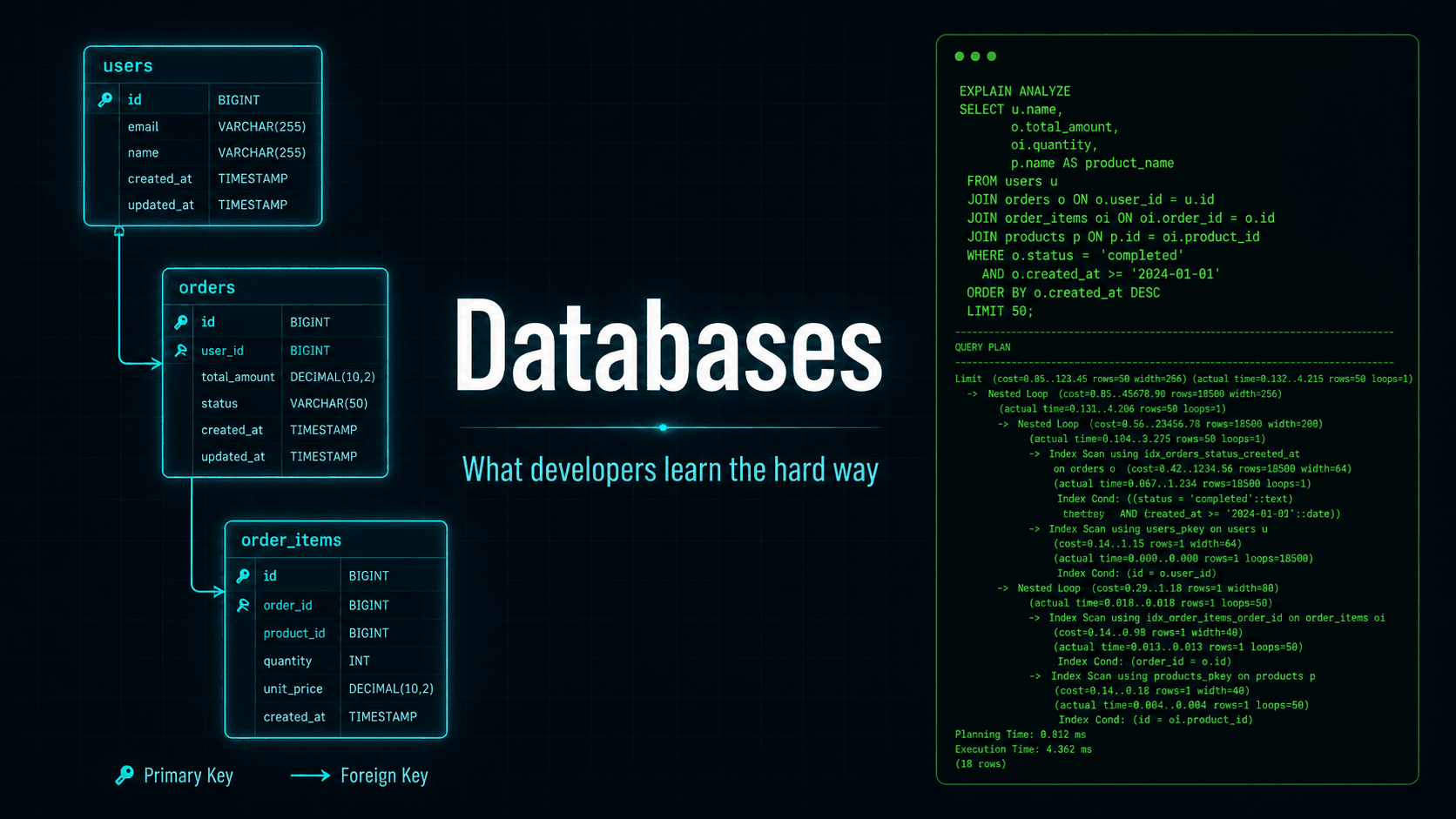
The second biggest mistake is not reading query plans. EXPLAIN ANALYZE in PostgreSQL (or EXPLAIN in MySQL) will tell you exactly how the database is executing your query — whether it's doing a sequential scan across millions of rows, whether it's using your index, and how long each step actually takes. Most developers never run this command. Developers who do run it once see a slow query fix itself in ten minutes, and then they run it on everything. For a thorough reference on query plans, the free guide Use The Index, Luke is the best resource available for developers, and the official PostgreSQL EXPLAIN documentation covers every option flag in detail.
The Real Advantages of Understanding Databases Deeply
Indexes are not magic — they're a trade
Most developers know indexes make reads faster. Fewer know that every index also makes writes slower, consumes storage, and needs to be maintained by the database engine on every insert, update, and delete. This trade is usually worth it. But adding indexes without checking whether they're being used — which PostgreSQL's pg_stat_user_indexes can tell you in one query — is how you end up with six indexes on a table and the database ignoring four of them.
Trick: Partial Indexes
1CREATE INDEX idx_users_active_email ON users (email) WHERE deleted_at IS NULL;This index is smaller, faster to build, and more cache-friendly. If most of your queries filter on deleted_at IS NULL, this will outperform the full-table index significantly.
CTEs make complex queries readable without sacrificing much
Common Table Expressions (WITH clauses) let you break a complicated query into named intermediate steps. The performance difference between a CTE and an equivalent subquery used to matter more than it does now — PostgreSQL 12 stopped materializing CTEs by default, so the optimizer can usually inline them.
1WITH active_users AS (
2  SELECT id, email FROM users WHERE deleted_at IS NULL
3),
4recent_orders AS (
5  SELECT user_id, COUNT(*) AS order_count
6  FROM orders
7  WHERE created_at > NOW() - INTERVAL '30 days'
8  GROUP BY user_id
9)
10SELECT u.email, COALESCE(r.order_count, 0)
11FROM active_users u
12LEFT JOIN recent_orders r ON r.user_id = u.id
13ORDER BY r.order_count DESC NULLS LAST;
Trick: Sort Control
RETURNING saves you a round trip
Most ORMs hide this from you, but PostgreSQL and some other databases support RETURNING on inserts, updates, and deletes. Instead of inserting a row and then querying to get the generated ID, you can get it back in one operation:
1INSERT INTO jobs (name, status)
2VALUES ('send-welcome-email', 'queued')
3RETURNING id, created_at;
In high-throughput applications this matters. Each round trip to the database adds latency. RETURNING eliminates an entire query.
Connection pooling is not optional in production
A PostgreSQL connection is expensive. The default limit is 100, and each connection holds memory (roughly 5–10MB per connection in some configurations). When your app server spins up 20 processes each trying to hold 5 connections, you've consumed 100 connections before the first real user shows up.
PgBouncer in transaction pooling mode multiplexes many application connections through a smaller pool of actual database connections. The setup takes about an hour. Without it, scaling horizontally often just means connection exhaustion at a slightly higher traffic level.
Where Developers Actually Get Stuck
The N+1 problem hides in plain sight
ORM code like this: sends one query to get all orders and then one query per order to get the user. With 500 orders, that's 501 queries. The page loads fine in development. In production with a real dataset it suddenly takes 8 seconds. For a thorough reference on ORM patterns, the SQLAlchemy joinedload vs subqueryload guide and EF Core eager loading docs cover eager loading in depth.
1orders = Order.query.all()
2for order in orders:
3    print(order.user.email)  # This hits the database once per order
Fix: Use eager loading (.joinedload(), includes, .preload() — whatever your ORM calls it). Or write the join yourself. Either way: if you're iterating over a result set and accessing a relationship inside the loop, you have an N+1.
Trick: Log Query Counts
Migrations on live tables are the silent killer
ALTER TABLE to add a column with a default value can lock the entire table in older versions of PostgreSQL. Adding a not-null column without a default blocks reads and writes while the database rewrites every row. In a table with 10 million rows and a table-level lock, that's a service outage.
Trick: The Expand/Contract Pattern
- 1. Expand: Add the new column, nullable, no default. (Fast, no lock.)
- 2. Backfill: Write a script that updates rows in small batches with sleeps between runs. (Never touches the table lock.)
- 3. Constrain: Add the NOT NULL constraint and default after backfill is done.
- 4. Contract: Drop the old column in a separate, later deployment.
Transactions don't fix every consistency problem
Wrapping operations in a transaction ensures they succeed or fail together. What transactions don't automatically fix is what happens when two transactions run at the same time. That's isolation level territory — and READ COMMITTED (the PostgreSQL default) can still produce non-repeatable reads, phantom reads, and lost updates under concurrent load.
This comes up most often in inventory or reservation systems. Two users booking the last seat, two requests decrementing the same stock count. Both can succeed at READ COMMITTED and produce wrong data.
Trick: Explicit Locks
1BEGIN;<br/>SELECT quantity FROM inventory WHERE product_id = 42 FOR UPDATE;<br/>-- Now no other transaction can modify this row until we commit<br/>UPDATE inventory SET quantity = quantity - 1 WHERE product_id = 42;<br/>COMMIT;Understand this before you build anything involving limited-quantity resources.
Improvement Tricks Most Tutorials Skip
Use covering indexes for hot queries. A covering index includes all the columns a query needs in the index itself, so PostgreSQL never has to go back to the main table (a "heap fetch"):
1CREATE INDEX idx_orders_user_status ON orders (user_id, status, created_at);If a query selects user_id, status, created_at and filters on user_id, this index satisfies the entire query from the index alone.
Use JSONB for flexible attributes, not for everything. PostgreSQL's JSONB column type is genuinely useful for storing semi-structured data — product attributes that vary by category, feature flags, configuration objects. It's not a replacement for proper relational modeling. If you're querying deeply into JSON on every hot path, you've gone too far.
Use GENERATED ALWAYS AS columns for computed fields. If a column is always derived from other columns, let the database compute and store it:
1ALTER TABLE orders ADD COLUMN total_cents INTEGER GENERATED ALWAYS AS (quantity * unit_price_cents) STORED;No more app-layer math that gets out of sync.
Read EXPLAIN (ANALYZE, BUFFERS) instead of just EXPLAIN ANALYZE. The BUFFERS option shows you cache hits vs disk reads. A query with poor buffer hit ratios is reading from disk every time — which tells you the working set doesn't fit in shared_buffers and you have a memory configuration or data access pattern problem, not just a query problem.
Pros & Cons at a Glance
Pros as Learning Levers
| What to Learn | What It Gets You |
|---|---|
| EXPLAIN ANALYZE | You stop guessing why queries are slow |
| Index selection & partial indexes | Smaller, faster, more targeted indexes |
| CTEs and window functions | Complex reporting without application-layer loops |
| Connection pooling (PgBouncer) | Horizontal scale without connection exhaustion |
| The expand/contract migration pattern | Zero-downtime schema changes |
| SELECT FOR UPDATE and isolation levels | Correct behavior under concurrent load |
Cons as Learning Warnings
| What Trips Developers | The Real Cost |
|---|---|
| N+1 queries hidden in ORM code | Pages that load fine locally, die in production |
| Indexes added without pg_stat_user_indexes checks | Wasted storage, slower writes, false confidence |
| ALTER TABLE on live table | Production table locks during business hours |
| Treating transactions as a full concurrency solution | Silent data corruption under concurrent load |
| JSONB for everything because it's 'flexible' | Unindexable queries and schema chaos |
| Skipping connection pooling until it breaks | Emergency 2am production fires |
Who Should Go Deep Here
Deeper database knowledge matters most for developers building anything with more than casual traffic, anything financial or inventory-related (where correctness is not negotiable), teams managing database migrations in CI/CD pipelines, and anyone whose app has started getting slower without obvious cause.
For early-stage projects with modest traffic, most of this is premature. Get the schema roughly right, avoid the obvious N+1 patterns, use reasonable indexes. Then come back to the advanced stuff when you have real queries and real load to measure against. Optimizing in a vacuum is mostly guessing.
"The best database resource I've found for PostgreSQL is the official docs and the 'Use the Index, Luke' guide (use-the-index-luke.com) — it's free, thorough, and written for developers not DBAs. For migrations on live systems, Brandur Leach's writing on Heroku's database migration practices is worth the read."